The AI coach only you can see
MuteHint listens to your call and shows short hints in a floating window. The other side sees you. You see the next thing to say.
- No card needed
- Live sessions on the free plan
- 7-day money-back guarantee
Try a call type
Same call, two screens
They see a confident you. You see the hints.
The hint window floats above your call and stays on your screen. Hide it with one shortcut, or let your clicks pass straight through it.
What the other side sees
What you see
The hint window stays out of
Screen share
Share your whole screen. The hint window is not in the picture.
The call itself
MuteHint never joins as a participant. Nobody sees a bot in the room.
Your clicks
Ctrl+M (Cmd+M on a Mac) lets the mouse pass through it to the app underneath.
A sudden glance
Ctrl+\ (Cmd+\ on a Mac) hides it instantly. A transparency slider handles the rest of the time.
Before a call that matters, share your screen once with a friend or a second device and check that the window stays out of the picture on your setup. How the window is hidden
Built for the moment your mind goes blank
Five AI profiles, each tuned to one kind of conversation. Pick one before you start.
Job interviews
An answer you can say while the question is still hanging in the air.
“Tell me about a conflict you handled.”
→ Two leads disagreed on a deadline.
→ I split the scope so both could ship.
Included in the free plan
Sales calls
Hear the objection, see a reply you can use straight away.
“This feels too expensive for us.”
→ What are you comparing it to?
→ One saved deal a month covers it.
Paid plans
Meetings
A clear thing to say when the room turns to you.
“So who is picking this one up?”
→ I can take that one.
→ First draft by Thursday.
Paid plans
The lines above are sample answers. Also included in paid plans: Presentations and Negotiations. See all use cases
On your first call in three steps
Step 1
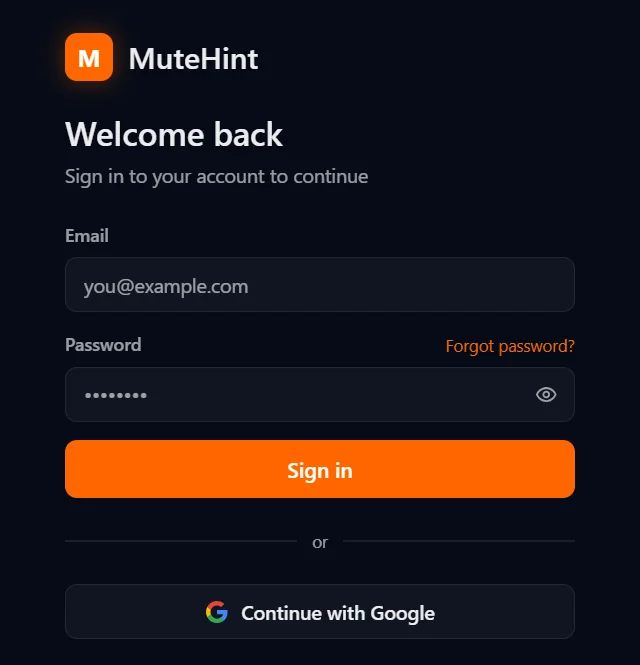
Create a free account
Sign up, then download the app for macOS or Windows from your dashboard. Sign in with your email or with Google.
Step 2
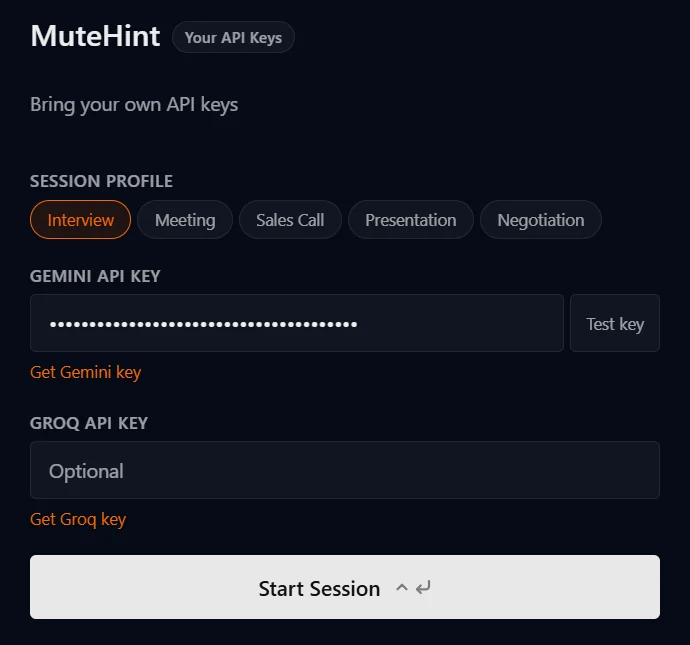
Add your own AI key
Paste a Gemini API key from Google AI Studio into the app and test it with one click. You pay Google directly, with no markup from us.
Step 3
Pick a profile and join
Start a session before your call. MuteHint listens, picks out the question you were just asked and puts an answer you can say on screen, with the key phrases in bold.
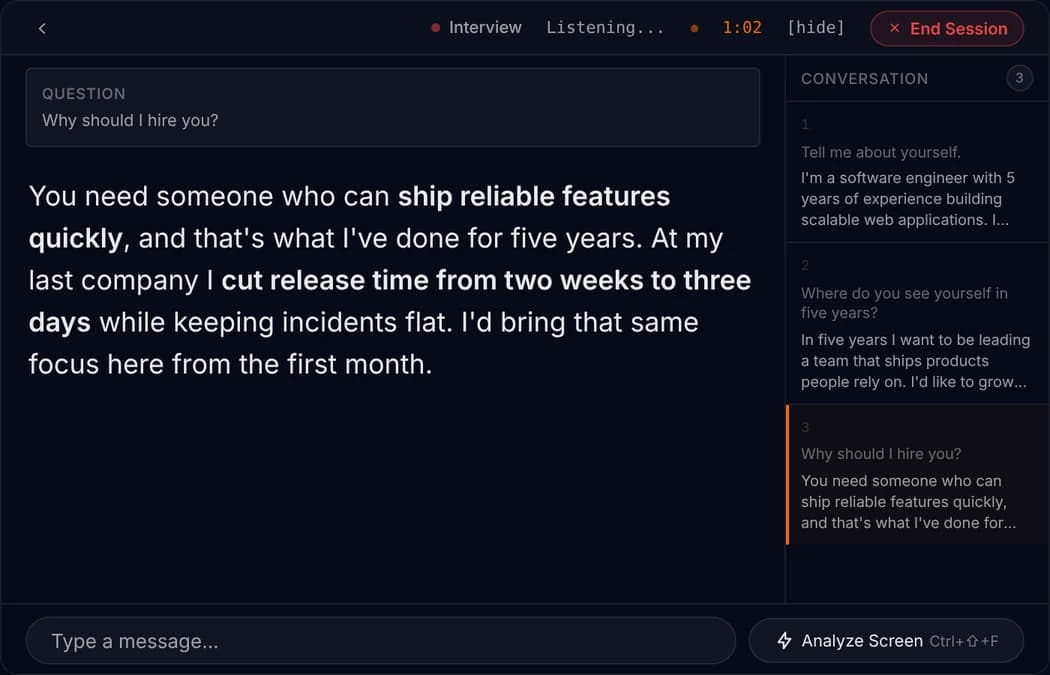
Example session. The question and answer are samples, shown on the app's live screen.

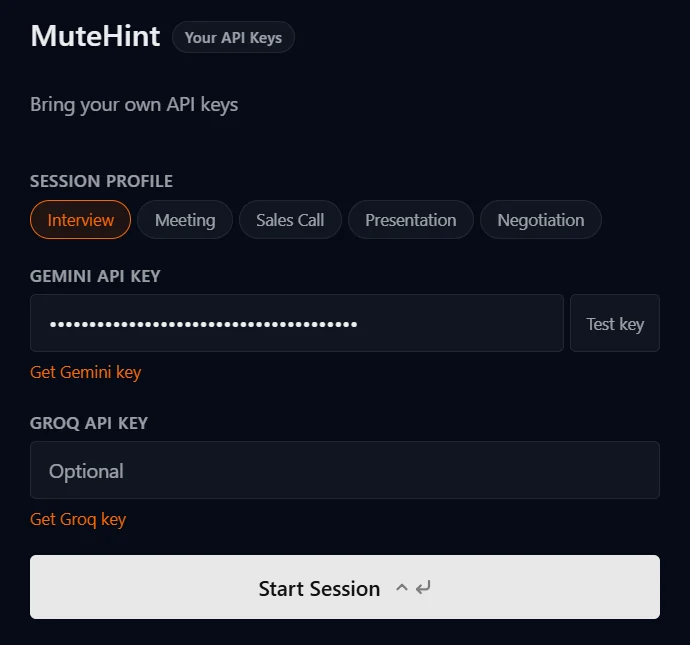
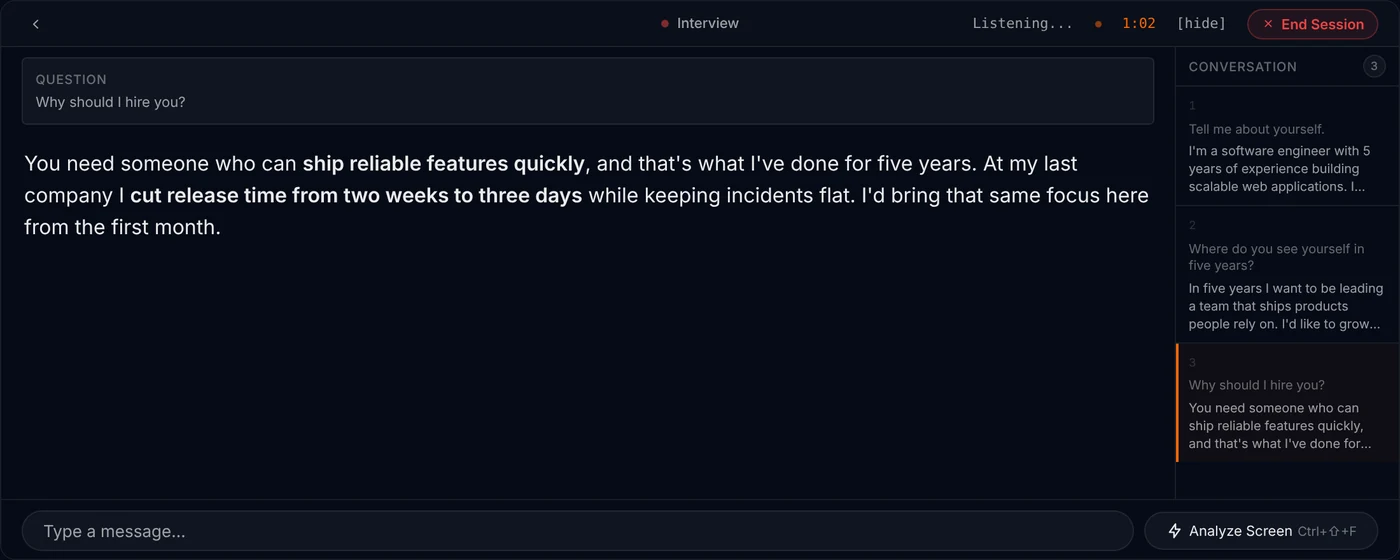
The MuteHint app
The real app, screen by screen
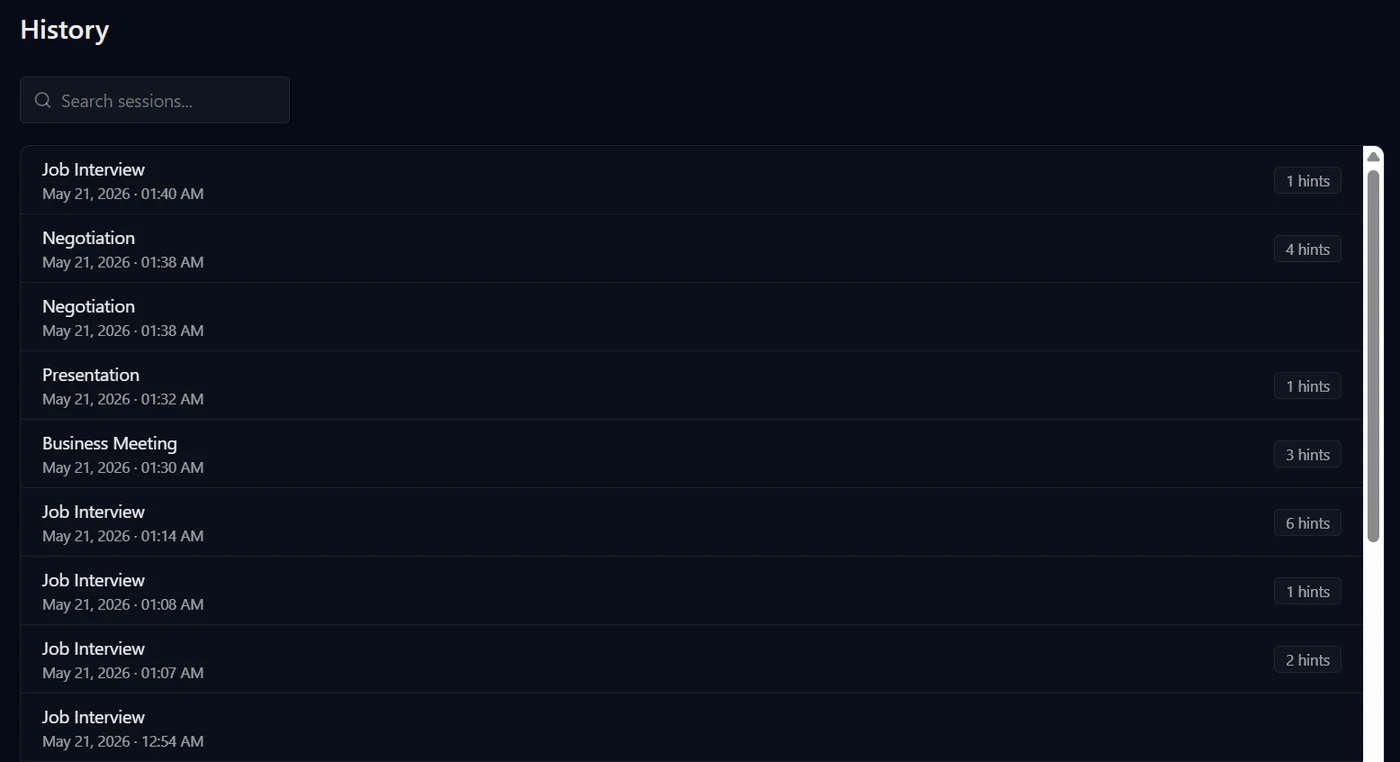
Go back over every call
Each session is saved with the call type, the time and how many hints you got, and you can search them.
Included in paid plans
What comes with it
More than a hint window. 30 languages, emergency erase, local AI.
The things that make it safe to use on a real call. Everything without a tag is in the Free plan too.
Left out of screen sharing
MuteHint asks macOS or Windows to leave its window out of screen shares and recordings. It never joins the call.
No taskbar or Dock icon
Nothing in the taskbar, the Dock or the tray gives it away on a shared screen. On a Mac it is also left out of Mission Control.
30 speech languages
English, Spanish, French, German, Arabic, Hindi, Tamil, Telugu, Mandarin, Japanese and more. Pick the language of the call in Settings.
Emergency erase
Ctrl+Alt+Shift+E (Cmd+Option+Shift+E) during a session hides MuteHint, ends the session, wipes what it keeps on your computer and quits.
Your CV, your notes, your pitch
Paste your resume, the job description, your product notes or your targets. Answers are written around them.
Read the screen
One button sends a single screenshot to your AI, for a coding problem, a chart or a slide. Nothing is captured continuously.
Paid plans
Run it on your own computer
Local AI runs speech recognition (Whisper) and answers (Ollama) on your own machine, so the call never leaves it.
Paid plans
Click straight through it
Ctrl+M (Cmd+M) lets your clicks pass through the window to the app underneath, so it never gets in your way.
Why MuteHint
Your key. Your audio. Nothing paid in advance.
Bring your own AI key
Audio goes from your device to your AI provider, not through us. You pay the provider directly, with no markup.
Stealth is not an add-on
The hidden window is the product. It is in every plan, including Free.
Pay once if you prefer
$25 covers a 15-day interview sprint. $110 covers every call you will ever take.
7-day money-back guarantee
Full refund within 7 days of purchase if no session has lasted more than 10 minutes.
The price on the page, and what you pay today
A low monthly price can mean a full year charged up front. Ours are billed exactly as shown.
- Lowest price shown
- MuteHint$25 one-timeParakeet AI$49.99 a monthCluely$19.99 a month
- Charged today to get it
- MuteHint$25Parakeet AI$599.90 for the yearCluely$19.99
- Paying month by month
- MuteHint$45Parakeet AI$149.90Cluely$19.99
- Hidden from screen share
- MuteHintEvery planParakeet AIListed on paid plansCluely$149.99 a month plan
- Pay once, keep it
- MuteHint$110 lifetimeParakeet AINot listedCluelyNot listed
| What is compared | MuteHint | Parakeet AI | Cluely |
|---|---|---|---|
| Lowest price shown | $25 one-time | $49.99 a month | $19.99 a month |
| Charged today to get it | $25 | $599.90 for the year | $19.99 |
| Paying month by month | $45 | $149.90 | $19.99 |
| Hidden from screen share | Every plan | Listed on paid plans | $149.99 a month plan |
| Pay once, keep it | $110 lifetime | Not listed | Not listed |
Competitor prices as listed on each company's pricing page on 7 October 2026. With MuteHint you also pay your AI provider for what you use. Full comparisons: MuteHint vs Parakeet AI, MuteHint vs Cluely.
Pay once. Or start free.
Every paid plan includes all 5 AI profiles and unlimited sessions. You are charged exactly the price shown, nothing in advance.
MuteHint opens soon. Join the waitlist and we will email you the day you can sign up.
Free
Real live sessions, not a demo.
- Interview profile
- 2 sessions a week
- 15 minutes a session
- 1 device
- No screen capture or session history
15-Day Pass
No renewal. You move back to Free after 15 days.
- All 5 AI profiles
- Unlimited sessions for 15 days
- No time limit on a session
- Screen capture
- Session history
- 1 device
Lifetime
Launch price for the first 50 buyers. Then $150.
- All 5 AI profiles
- Unlimited sessions, forever
- No time limit on a session
- Screen capture
- Session history
- Every future update
- 3 devices
Monthly
Billed monthly. Cancel any time.
- All 5 AI profiles
- Unlimited sessions
- No time limit on a session
- Screen capture
- Session history
- 2 devices
What you will never be charged for
No year paid up front
$45 a month means $45 charged today.
No credits to top up
Paid plans are unlimited. No meter running during a call.
No paid stealth upgrade
The hidden window is in every plan.
No markup on AI
You pay your AI provider directly for what you use.
Full refund within 7 days of purchase if no session has lasted more than 10 minutes. Refund policy
Questions people ask before they try it
Can the other side see MuteHint during my call?
No. The hint window appears only on your screen, and MuteHint never joins the call as a participant. Click-through mode (Ctrl+M, or Cmd+M on a Mac) lets your mouse keep working with the call underneath, and Ctrl+\ (Cmd+\ on a Mac) hides the window instantly.
Is the free plan really free?
Yes. You get 2 live sessions a week with the Interview profile, on one device. Each session lasts up to 15 minutes. No card is needed. Paid plans add all 5 AI profiles, unlimited sessions with no time limit, screen capture and session history.
What is BYOK, and do I pay for AI separately?
BYOK stands for Bring Your Own Key. MuteHint uses your own Gemini API key from Google AI Studio. Your plan covers the MuteHint app, and you pay Google directly for the AI you use, with no markup from us. Google sets those prices and offers a free tier; check Google's current terms for what it covers.
Will I be charged anything in advance?
No. The price shown is the amount charged. The 15-Day Pass and Lifetime are single payments that never renew. Monthly is billed one month at a time and you can cancel whenever you like.
Which apps and computers does it work with?
MuteHint runs on macOS and Windows. On a Mac you need macOS 13 or later; there is one download for Apple Silicon (M1 or later) and one for Intel. On a PC you need Windows 10 or 11, 64-bit. It works alongside Zoom, Google Meet, Microsoft Teams, Webex and other video call apps.
Can I get my money back?
Yes. You get a full refund within 7 days of purchase if no session has lasted more than 10 minutes. Email support@mutehint.com.
Is using MuteHint during interviews cheating?
MuteHint puts a suggested answer on your screen while you talk. Whether that is acceptable depends on the rules of the situation you are in. Most sales calls, meetings and negotiations have no rule against notes or help. Where an interview, a test or an employer has an explicit rule against AI help, you should respect that rule, and our Terms do not allow use where it is prohibited.
Does MuteHint record my calls?
No. Audio goes straight from your computer to Google using your own API key. It is not sent to MuteHint and we keep no recording. On a paid plan, MuteHint saves the hints shown to you and the context you typed for the session, so they can appear in your history. On the Free plan, which has no history, they are not saved.
More answers on the FAQ page.
Your next call is coming either way. Take a coach in with you.
Two free 15-minute sessions every week. Set up before your call starts.
No card needed. Paid plans from $25, with a 7-day money-back guarantee.