FAQ
Questions people ask before they try it
Short answers, checked against how the app works today.
Staying hidden
Can the other side see MuteHint during my call?
No. The hint window appears only on your screen, and MuteHint never joins the call as a participant. Click-through mode (Ctrl+M, or Cmd+M on a Mac) lets your mouse keep working with the call underneath, and Ctrl+\ (Cmd+\ on a Mac) hides the window instantly.
What happens when I share my screen?
MuteHint asks your operating system to leave its window out of screen sharing and recording, so you can share your whole screen. Before a call that matters, share your screen once with a friend or a second device and check. If the window ever shows up on your setup, Ctrl+\ (Cmd+\ on a Mac) hides it while you share.
What if I need MuteHint gone right now?
Press Ctrl+Alt+Shift+E (Cmd+Option+Shift+E on a Mac) during a session. MuteHint hides, ends the session, wipes what it keeps on your computer and quits. It also has no taskbar or Dock icon, so a shared screen does not show it is running.
Does MuteHint join the call or show up as a participant?
No. It listens to the sound on your own computer. Nothing joins the meeting, and there is no bot in the participant list.
Price and refunds
Is the free plan really free?
Yes. You get 2 live sessions a week with the Interview profile, on one device. Each session lasts up to 15 minutes. No card is needed. Paid plans add all 5 AI profiles, unlimited sessions with no time limit, screen capture and session history.
Will I be charged anything in advance?
No. The price shown is the amount charged. The 15-Day Pass and Lifetime are single payments that never renew. Monthly is billed one month at a time and you can cancel whenever you like.
Can I get my money back?
Yes. You get a full refund within 7 days of purchase if no session has lasted more than 10 minutes. Email support@mutehint.com.
What happens when my 15-Day Pass ends?
Nothing is charged. Your account moves back to the Free plan, and you can buy another pass or a different plan whenever you like.
How do I cancel Monthly?
Open Plan and billing in your dashboard and choose Cancel Monthly. It stays on until the end of the month you paid for, and you are not charged again.
Your AI key
What is BYOK, and do I pay for AI separately?
BYOK stands for Bring Your Own Key. MuteHint uses your own Gemini API key from Google AI Studio. Your plan covers the MuteHint app, and you pay Google directly for the AI you use, with no markup from us. Google sets those prices and offers a free tier; check Google's current terms for what it covers.
Where do I get a key, and where does it go?
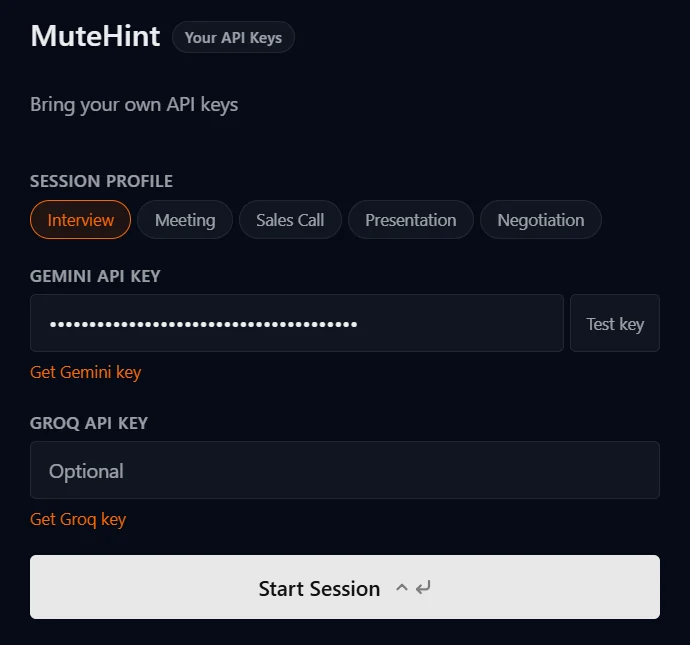
Create a Gemini API key in Google AI Studio, paste it into the field on the app's start screen and press Test key. The app tells you straight away whether it works.
Is my API key safe?
Your key is kept on your own computer and is used to talk to Google directly. It is not sent to MuteHint's servers. The app encrypts it using your operating system's built-in protection where that is available.
Which AI providers can I use?
A Google Gemini key is required: it powers the live audio. You can also add a Groq key, which is optional. On paid plans, Local AI can run speech recognition (Whisper) and answers (Ollama) on your own computer instead, so the call never leaves it.
Privacy
Does MuteHint record my calls?
No. Audio goes straight from your computer to Google using your own API key. It is not sent to MuteHint and we keep no recording. On a paid plan, MuteHint saves the hints shown to you and the context you typed for the session, so they can appear in your history. On the Free plan, which has no history, they are not saved.
What does MuteHint store about me?
Your account email and plan, the devices you sign in on, and for each session its time, length and profile, and, on paid plans, the hints that were shown and the context you typed in. We do not store call audio or your API keys.
Setup and platforms
Which apps and computers does it work with?
MuteHint runs on macOS and Windows. On a Mac you need macOS 13 or later; there is one download for Apple Silicon (M1 or later) and one for Intel. On a PC you need Windows 10 or 11, 64-bit. It works alongside Zoom, Google Meet, Microsoft Teams, Webex and other video call apps.
Does it listen to me or to the other person?
By default it listens to the other side: the sound coming out of your computer. In Settings you can switch it to your microphone, or to both.
Which languages does MuteHint understand?
30 speech languages: English (US, UK, Australia and India), Spanish, French, German, Italian, Portuguese, Dutch, Polish, Russian, Turkish, Arabic, Hindi, Bengali, Gujarati, Kannada, Malayalam, Marathi, Tamil, Telugu, Mandarin Chinese, Japanese, Korean, Indonesian, Thai and Vietnamese. Pick the language of the call in Settings.
What are the five profiles?
Interview, Meeting, Sales Call, Presentation and Negotiation. Each one tells the AI what kind of conversation you are in. The Free plan includes Interview; paid plans include all five.
Can I give it my CV or my pitch?
Yes. Paste your CV, the job description, your pitch or your notes into the context box before you start. The AI uses it to write answers that sound like you.
Is it allowed?
Is using MuteHint during interviews cheating?
MuteHint puts a suggested answer on your screen while you talk. Whether that is acceptable depends on the rules of the situation you are in. Most sales calls, meetings and negotiations have no rule against notes or help. Where an interview, a test or an employer has an explicit rule against AI help, you should respect that rule, and our Terms do not allow use where it is prohibited.
Do I have to tell the other side?
MuteHint does not join or record the call. Laws and workplace rules about using assistance on calls differ by country and employer, and you are responsible for following the ones that apply to you.
Where the key goes
One field, one button
This is the app's start screen. Paste your Gemini API key from Google AI Studio into the field and press Test key. The app tells you straight away whether it works.
The key stays on your computer. The Groq field under it is optional.
Still have a question? Email support@mutehint.com
Your next call is coming either way. Take a coach in with you.
Two free 15-minute sessions every week. Set up before your call starts.
No card needed. Paid plans from $25, with a 7-day money-back guarantee.